Exploring and Assessing Tech Tools
One of the things I like about being in graduate school (just one more class to go!) is having a reason to set aside actual time to both assess existing practices and explore new options. This week I was tasked with exploring new (to me) tech tools. Here’s how it went!
Notes and Source Organizers
Evernote Vs. Google Docs (and more)
I used Evernote way back in the day, during my first go-round at grad school, in fact! I just logged in to my old account, and the last time I touched it was 2016, and that was just one note. Beyond that all my notebooks were from 2014 and earlier. I remember mostly using it for notes in class, and also feeling like I wasn’t using it to its full potential.
Verdict: more exploration required, but I doubt it will draw me away from Google Docs and raindrop.io. The simplicity and adaptability work for me, and being in a “google school”, it’s hard to beat the integration possibilities of having everything in Google Drive. I’ve been bookmarking websites using raindrop.io for a few years now, and I like that it can be as simple or as complicated as I want.
Mind Map Makers
Mindmeister vs. Mindmup
Immediate bookmark! I don’t make mindmaps all that often, but whenever I do they are so incredibly useful. They are particularly helpful for me when I’m trying to wrap my head around a complex topic. The SSU lesson plan requires a mindmap, and it changed my workflow. I had been using Mindmup, but I think I like the interface of MindMeister better. I also really like the variety of templates and design options, and the option to attach documents. The thing I don’t like? The three map limit. If I start mind mapping everything (honestly would probably be good for me), it might be worth a subscription. But for now, I will probably stick with making one-off maps for free on Mindmup.
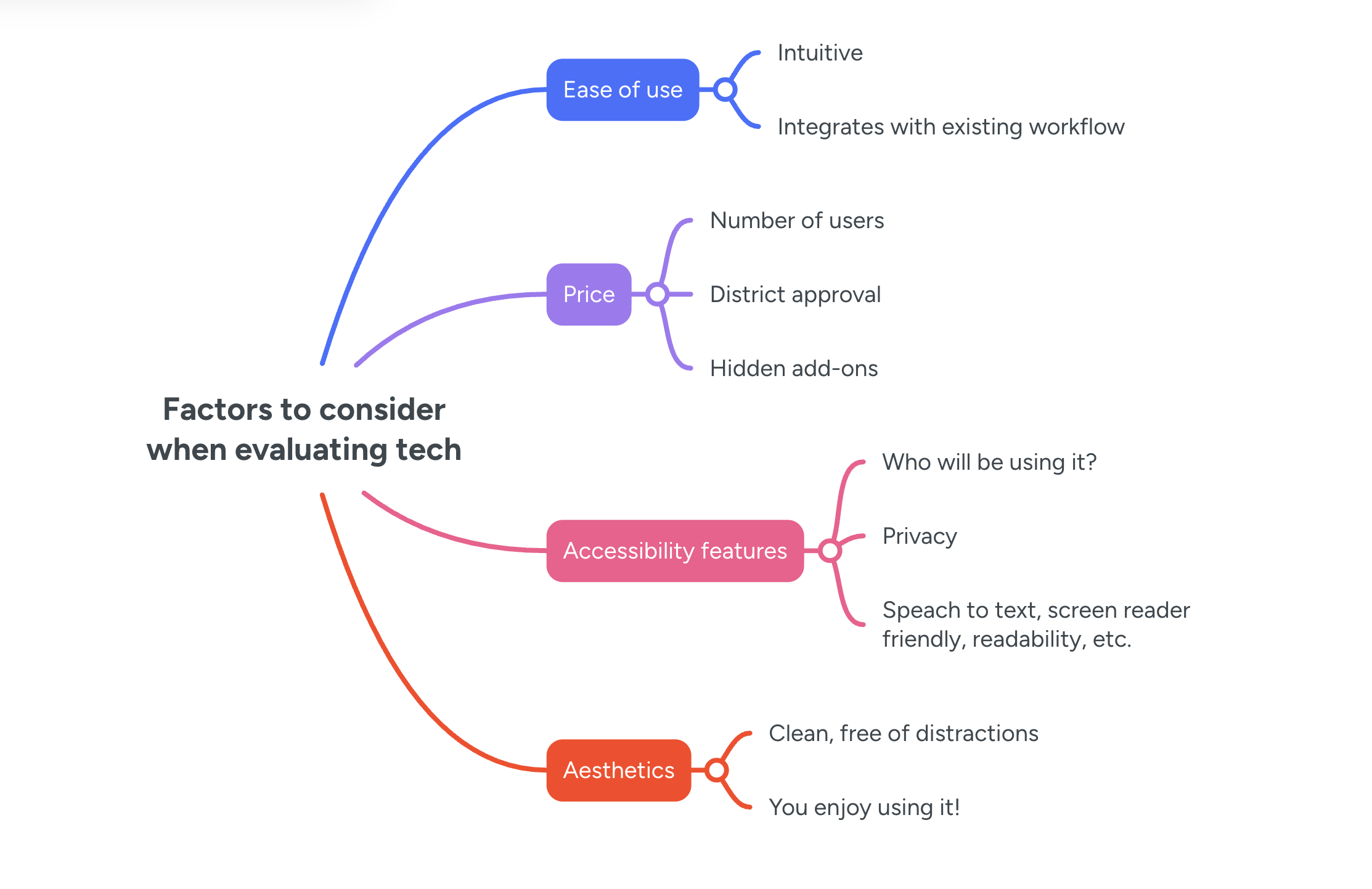
Created with MindMeister
Verdict: not enough of an improvement over Mindmup to be worth it. Good to keep in mind, but likely won’t be using often.
Visual content collections
Wakelet vs. Padlet
I do like all the different templates Wakelet offers, but I’m not entirely sure how it differs from Padlet. The district I currently work at subscribes to Padlet, so I suspect I would not reach for Wakelet over Padlet. However, if I’m honest, I’m also not quite sure how teachers are effectively using Padlet either.
Verdict: Looks cool, but not a high priority.
RSS Feed Aggregators
Creating your own “feed” of articles and posts across the internet.
Inspired by this article, I was curious about the idea of returning to RSS feed readers. I started to look into one of the tools listed, Feedly. It turns out this is another tool I already had an account with, and had completely let fall by the wayside years ago. Interestingly, the marketing language has changed drastically for this company since the article was written. While they still offer the news reader, it looks like much of their efforts are now in assisting CTI teams (Cyber Threat Intelligence, Google tells me) identify threats through the power of AI. I admit, I only have a vague idea what this means. The news reader seems intuitive, and I like that you can adjust how you view your feed. Still, it says things like “The insights you need to keep ahead” which feels like maybe the goal is something different than I would be using it for.
Inoreader, on the other hand, seems to be a more robust tool for the kind of personal-use content curating I would want in an RSS feed aggregator. They even give you the option to choose which LLM you want powering the AI features (OpenAI, Anthropic, etc). Inoreader also advertises something called “social media listening” - a feature that “listens in” to brands on social media and identifies trends. The idea, I believe, is so that you can stay on top of market trends. Overall Inoreader seems geared towards business owners - this is more relevant to my use case than monitoring cyber threats, but still a little bit off base. I am curious to see how it will work as a way to keep on top of education and library news/trends.
Verdict: I want to try Inoreader as part of my personal professional practice, but am not certain it will stick.
Social Reading
Goodreads, Storygraph, Bookji, Beanstack
The most well-known social reading platform is goodreads. The strengths of this platform, in my mind, are that almosteveryone knows about it, and the number of reviews gathered on every book reflects this. I also find it to be the easiest to update. I do a lot of my reading via Libby and my Kindle Paperwhite. As soon as I open a book on my Kindle, Goodreads automatically updates my profile. You can also decide on a book-by-book basis to not have it updated, if I’d like to keep certain titles private.
However, as someone who is trying to get away from Amazon products, I much prefer Storygraph. They are an independently run reading platform, similar to goodreads but with a more streamlined interface. They operate via a small team plus a fleet of volunteer “librarians” - something I really only know because my sister is one. Other pros include:
The ability to include half and quarter stars
Filters by mood
Standard form for reviews, making note of things like character vs plot, pace of reading, etc.
A lot of fun challenges
Private reading journal
A lot more statistics available to see various trends in your reading life!
I have barely scratched the surface of Storygraph, but I really like it.
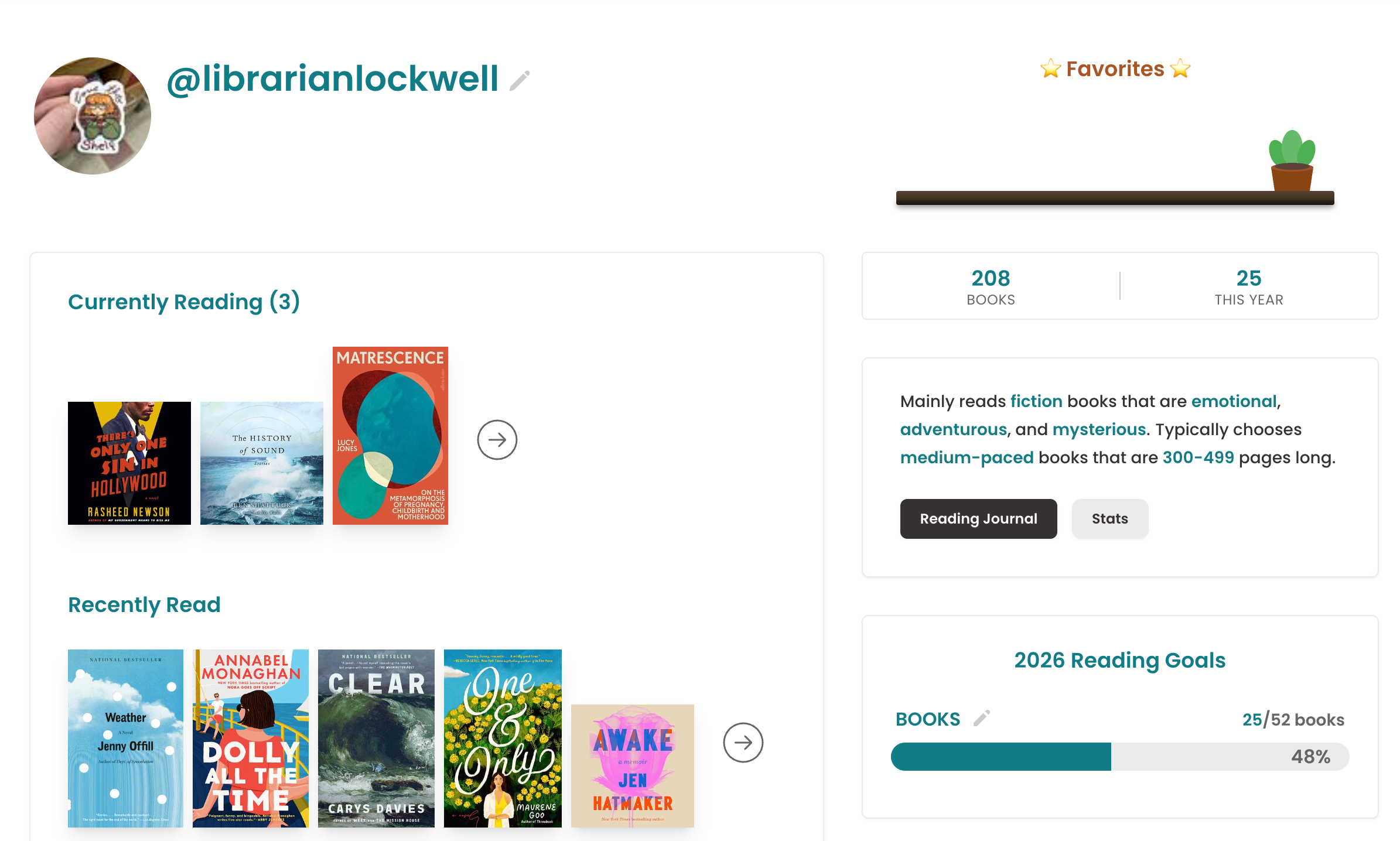
I haven’t been using it long (consistently for probably 6 months?) but I’m loving Storygraph!
In terms of social reading in school, it gets a little more complicated. School districts rightly have strict privacy restrictions, and the younger your students are the more you need to make sure their information is protected, and that they aren’t going to be interacting with just anyone. The district I work in has used Beanstack to promote reading at the Middle School level the past two years; the kids and teachers have a great time competing to be top readers and earn prizes. Benny the Bean, the platform mascot, is also pretty dang adorable.
The other social reading platform for schools that I’ve been curious about is Bookji. Two years ago, at the MSLA conference, I went to a presentation by the founder: Will Peters. He spoke passionately about how when he was a kid he was not a reader, and it wasn’t until High School the magical world of reading opened up to him. In college, as a computer science major, he began a website project that matched books with readers. As he talked with people, the ideas grew, and now it is a platform that encourages students to react and discuss what they’re reading (Bookji = Book + Emoji). It has since grown, and complies with all the important privacy guidelines, and even will automatically bring up reminders and alerts if a student is about to share information that might be personal. I went down a bit of a rabbit hole looking into this platform, and found this blog post really interesting. It discusses the issues with prizes and reading challenges, and how to better support intrinsic motivation.
Intrinsic vs. Extrinsic motivation has been something I’ve thought about a lot lately; Of course we all know intrinsic motivation is the gold standard, but at the same time I (and students!) love stickers and prizes. What I don’t know is something like Bookji, where the rewards are mostly social and self-imposed, is enough to get nonreaders interested in reading. I would like to think so - I have seen the social aspect of reading sweep across a high school, as one person reads a book they can’t stop talking about and make all their friends read it.
Anyway! I have no direct experience with Bookji, but I’d be curious to do a trial run and see if it catches on. I can see it either being great, or mostly ignored by students. In terms of pricing, they do have a “book club” tier, where you can have up to 50 students. I think this would be a great way to introduce the idea and see how it works. Next year we are going to be starting a Student Library Advisory (one of the big outcomes from this year's MSLA conference); perhaps we could have them join and see what they think!
Verdict: I love Storygraph for personal use, and am curious about Bookji for education.
Recap
This week's exploration was a good reminder that choosing a tech tool is rarely just about what a tool does. Functionality matters, of course, but so does aesthetics, pricing structure, how a tool fits into an existing workflow, what a school or district already has available, and even the values of the company behind it. Sometimes the best tool on paper loses out to the one that's already open in another tab, the one your colleagues are already using, or the one that doesn't require handing your data over to a company you'd rather not support. As I continue building out my professional practice, I think that's worth keeping in mind: the goal isn't to find the objectively superior tool, it's to find the right tool for the right context.*
*AI Alert: I was having a hard time coming up with a way to wrap this all up, so I turned to Claude. I ended up using it’s draft of a closing paragraph more or less unedited. You can check out the whole conversation here. I’m still getting my bearings with AI, but I do like Claude for writing help. I don’t love how sycophantic it can be, but it was genuinely helpful to have it present three different options of themes to pull out.